 6af6126c39
Bumps [decode-uri-component](https://github.com/SamVerschueren/decode-uri-component) from 0.2.0 to 0.2.2. - [Release notes](https://github.com/SamVerschueren/decode-uri-component/releases) - [Commits](https://github.com/SamVerschueren/decode-uri-component/compare/v0.2.0...v0.2.2) --- updated-dependencies: - dependency-name: decode-uri-component dependency-type: indirect ... Signed-off-by: dependabot[bot] <support@github.com> Signed-off-by: dependabot[bot] <support@github.com> Co-authored-by: dependabot[bot] <49699333+dependabot[bot]@users.noreply.github.com> |
||
|---|---|---|
| .github/workflows | ||
| docker | ||
| docs | ||
| frontend | ||
| itests | ||
| proto | ||
| squeaknode | ||
| tests | ||
| .dockerignore | ||
| .flake8 | ||
| .gitignore | ||
| .pre-commit-config.yaml | ||
| CHANGELOG.md | ||
| clightning-config.ini | ||
| config-mainnet.ini | ||
| config-other.ini | ||
| config.ini | ||
| createdb.sql | ||
| Dockerfile | ||
| entrypoint.sh | ||
| LICENSE | ||
| Makefile | ||
| MANIFEST.in | ||
| PGP.txt | ||
| README.md | ||
| requirements-dev.txt | ||
| requirements-itest.txt | ||
| requirements.txt | ||
| setup.cfg | ||
| setup.py | ||
| torrc | ||
| tox.ini | ||
squeaknode


A peer-to-peer status feed with posts unlocked by Lightning.
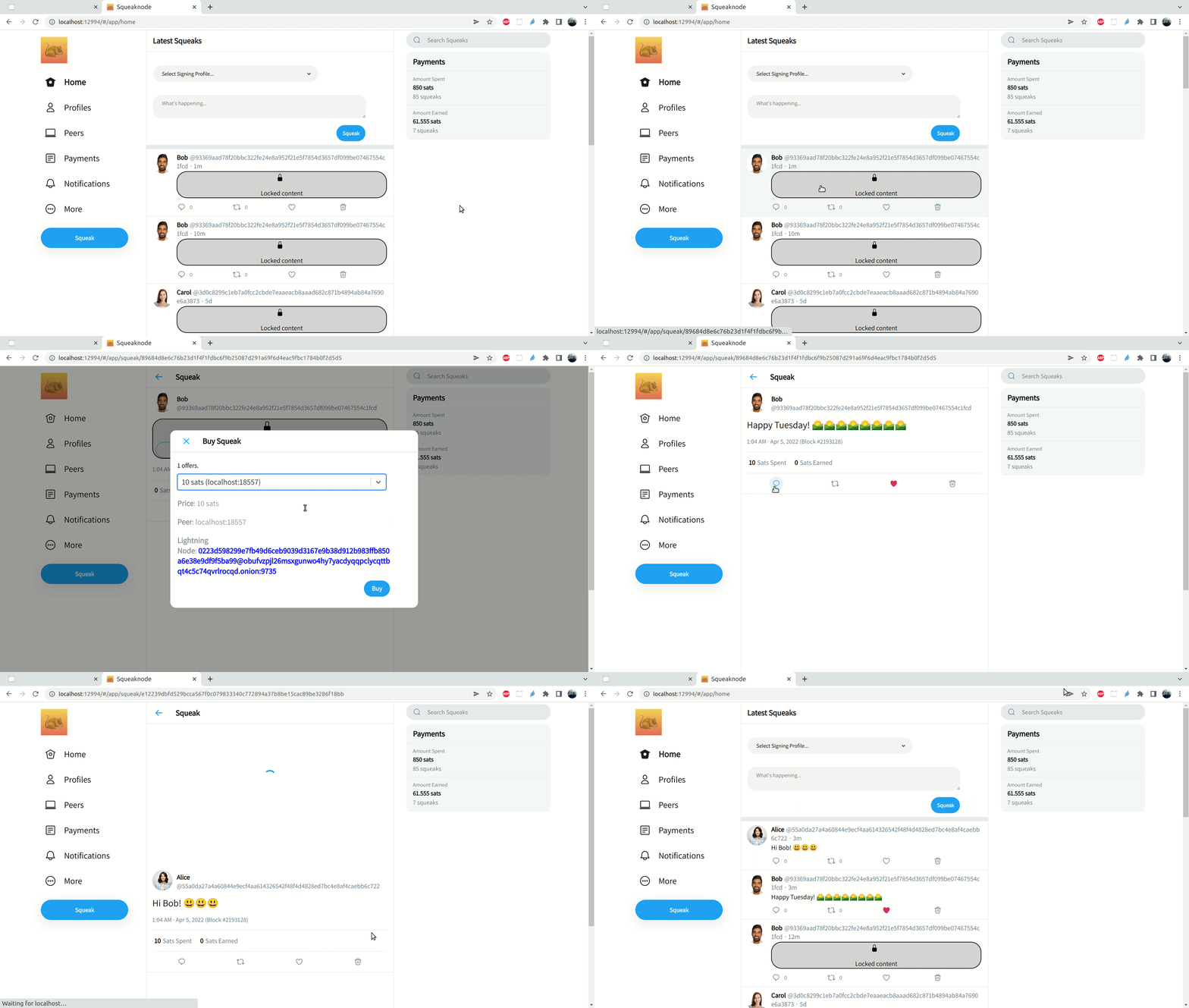
Squeaknode allows you to create, view, buy, and sell squeaks.
A squeak is an immutable, signed structure that:
- contains up to 280 utf-8 characters of text, encrypted (can only be decrypted with access to the decryption key obtained by lightning payment)
- contains the height and block hash of the latest bitcoin block
- contains the public key of the author
- contains the public key of the recipient, if the text is end-to-end encrypted
- contains the hash of another squeak, if the squeak is a reply
- can be used to derive a unique hash
The protocol is defined here.
Installation
Requirements
- a Bitcoin node
- an LND node
- Python 3.6 or later
Optional
- a Tor SOCKS5 proxy (you can open Tor Browser and run it in the background)
Step 1. Create the configuration
Create a config.ini file and fill in the relevant sections to connect to your Bitcoin node and LND node:
[node]
network=mainnet

[lightning]
backend=lnd
lnd_tls_cert_path=~/.lnd/tls.cert
lnd_macaroon_path=~/.lnd/data/chain/bitcoin/mainnet/admin.macaroon

[bitcoin]
rpc_host=localhost
rpc_port=8332
rpc_user=devuser
rpc_pass=devpass

[tor]
proxy_ip=localhost
proxy_port=9150

[webadmin]
enabled=true
username=devuser
password=devpass
If you want to use c-lightning as the Lightning Network node backend instead of LND, replace the lightning section with the following:
[lightning]
backend=clightning
clightning_rpc_file=~/.lightning/lightning-rpc
Add any other configs that you need.
Step 2. Install squeaknode:
pip install squeaknode
Or install from source
python3 -m venv venv
source venv/bin/activate
pip install .
Step 3. Start squeaknode:
squeaknode --config config.ini
Go to http://localhost:12994/ and use the username/password in config.ini to log in.
Test
Unit tests:
Requirements
- tox
make test
Integration tests:
Requirements
- docker-compose
- jq
make itest
Release + Commit Verification
All releases and all maintainer commits as of January 5, 2022 are signed by key D761F27D9B20BA52 (yzernik@gmail.com). The key can be found in this repo and on the Squeaknode website.
Telegram
License
Distributed under the MIT License. See LICENSE file.